HTML+CSS实现导航条下拉菜单的示例代码详解
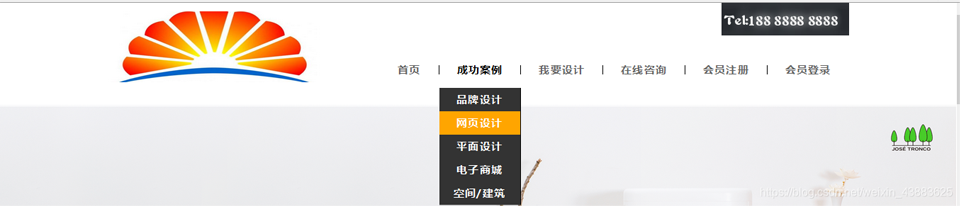
导航条下拉菜单效果预览
下面展示的代码实现了一个常见的导航条下拉菜单效果,其中使用的图片资源可以根据实际项目需求自行替换。
HTML结构代码
首先构建导航条的HTML结构,包含左侧Logo区域和右侧导航菜单区域。导航菜单中,“成功案例”项包含一个下拉子菜单。
<header>
    <div>
        <img src="img/logo.jpg">
    </div>
    <div>
        <div>
            <img src="img/number.jpg">
        </div>
        <ul>
            <a href="#"><li>首页</li></a>
            <a href="#"><li>
                <span>成功案例</span>
                <ul>
                    <li>品牌设计</li>
                    <li>网页设计</li>
                    <li>平面设计</li>
                    <li>电子商城</li>
                    <li>空间/建筑</li>
                </ul>
            </li></a>
            <a href="#"><li>我要设计</li></a>
            <a href="#"><li>在线咨询</li></a>
            <a href="#"><li>会员注册</li></a>
            <a href="#"><li>会员登录</li></a>
        </ul>
    </div>
</header>
CSS样式代码
接下来为导航条添加样式,包括整体布局、菜单项样式、下拉菜单的隐藏与显示效果等。
.header{
    height: 120px;
    width: 1046px;
    margin: 0 auto;
}
.header_left{
    float: left;
    line-height: 120px;
}
.header_left img{
    width: 300px;
    height: 100px;
}
.header_right{
    float: right;
    height: 120px;
    position: relative;
}
.header_right>div{
    position: absolute;
    top: 0;
    right: 0;
}
.header_right ul{
    margin-top: 88px;
}
.header_right ul a li{
    border-right: 1px solid #000000;
    height: 13px;
    font-size: 15px;
    padding: 0 25px;
    font-weight: bold;
    color: #666;
}
.header_right ul a{
    float: left;
    line-height: 13px;
}
.header_right ul a li:hover{
    color: #000000;
}
.header_right ul a:last-child li{
    /* 去掉最后的边框 */
    border: none;
}
.show_list{
    position: relative;
}
.show_list .move_list{
    display: none;
    z-index: 103;
    position: absolute;
    top: -56px;
    left: 0;
    width: 100%;
    background: #333;
    text-align: center;
}
.show_list .move_list li{
    padding: 10px 0;
    width: 114px;
    color: #fff;
}
.header_right ul a .show_list{
    padding-bottom: 20px;
    border-right: none;
}
.show_list:hover .move_list{
    display: block;
}
.header_right ul a:nth-child(3){
    border-left: 1px solid #000;
}
.show_list .move_list li:hover{
    color: white;
    background: orange;
}
CSS重置代码
为了确保页面在不同浏览器中表现一致,需要添加以下CSS重置代码。
* {
    margin: 0;
    padding: 0
}
em,i {
    font-style: normal
}
li {
    list-style: none
}
a{
    font: 14px/24px Microsoft YaHei,Arial,5B8B4F53,Arial Narrow;
    letter-spacing: 1.2px;
    color: #666;
    text-decoration: none
}
a:hover {
    color: #c81623 ;
}
img {
    border: 0;
    vertical-align: middle
}
input{
    outline: none;
}
button {
    cursor: pointer;
    border:none;
    outline: none;
}
以上便是使用HTML和CSS实现导航条下拉菜单的完整示例代码。通过合理的结构布局与样式控制,即可轻松实现常见的下拉菜单交互效果。
原文链接:本站整理
本文来自互联网用户投稿,该文章观点仅代表作者本人,不代表本站立场。本站仅提供信息存储空间服务,不拥有所有权,不承担相关法律责任。
如若内容造成侵权/违法违规/事实不符,请将相关资料发送至 service@2cto.cc 进行投诉反馈,一经查实,立即处理!
您可能感兴趣的文章:
上一篇:没有了
下一篇:HTML中使用Flex布局实现双行夹批效果的方法详解
下一篇:HTML中使用Flex布局实现双行夹批效果的方法详解