
HTML与Vue实现蜂窝菜单:CSS动画与交互逻辑详解
蜂窝菜单效果预览
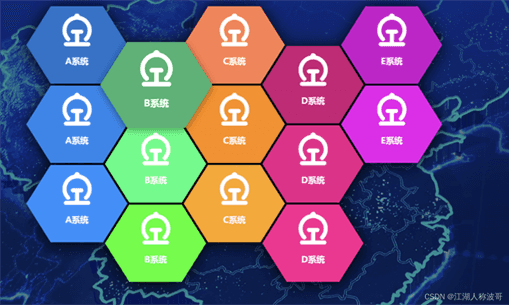
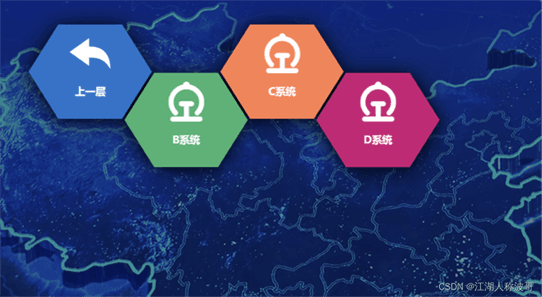
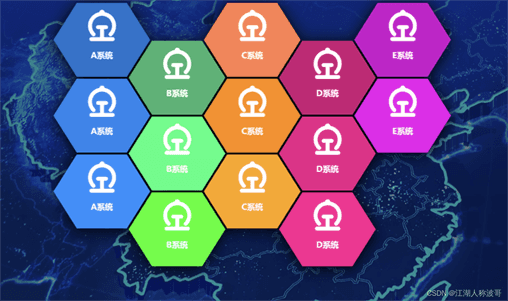
蜂窝菜单是一种以六边形网格排列的导航菜单,视觉上类似蜂巢结构。本文提供的示例通过CSS动画和Vue数据驱动实现菜单的展开、悬停和层级切换,效果如下图所示。
CSS样式实现
蜂窝菜单的核心视觉依赖于CSS的clip-path属性,将每个菜单项裁剪为六边形。同时,通过关键帧动画实现菜单项的淡入和下落效果,增强交互体验。
@keyframes _fade-in_mkmxd_1 { 0% { filter: blur(20px); opacity: 0 } to { filter: none; opacity: 1 }}@keyframes _drop-in_mkmxd_1 { 0% { transform: var(--transform) translateY(-100px) translateZ(400px) } to { transform: var(--transform) }}._examples_mkmxd_3 { margin-top:200px; position: relative; width:1000px; height: 640px; transition: transform .15s ease-out; filter: drop-shadow(0 4px 18px rgba(0,0,0,1)); --grid-width: 140px; left: 50%; transform: translate(-50%, 0px);}._examples_mkmxd_3 div { position: relative; transition: filter .25s ease-out; animation: _fade-in_mkmxd_1 .35s cubic-bezier(.215,.61,.355,1) var(--delay) backwards;}._examples_mkmxd_3 div:hover { filter: drop-shadow(0 4px 8px rgba(0,0,0,.4)); z-index: 3;}._examples_mkmxd_3 a { position: absolute; --transform: perspective(75em) rotateX(0deg) rotateZ(-0deg) translate(calc(var(--x) * 100%), calc(var(--y) * 86.67%)) scale(1.145); transform: var(--transform); animation: _drop-in_mkmxd_1 .35s cubic-bezier(.215,.61,.355,1) var(--delay) backwards; transition: transform .25s ease-out; /*clip-path: polygon(50% 100%,93.3% 75%,93.3% 25%,50% 0%,6.7% 25%,6.7% 75%);*/ /*clip-path: polygon(25% 93.3%,75% 93.3%,93.3% 50%,75% 6.7%,25% 6.7%,6.7% 50%);*/ clip-path: polygon(25% 87%,75% 87%,98.3% 50%,75% 13%,25% 13%,1.7% 50%);}._examples_mkmxd_3 a:hover{ transform: var(--transform) translateZ(10px) scale(1.1);}._examples_mkmxd_3 img { aspect-ratio: 1; object-fit: cover; height: 64px; width: 64px; transform: translate(-50%, 40px); left: 50%; position: absolute; /*filter: drop-shadow(2px 2px 0px #00BFFF);*/}img { max-width: 100%; height: auto; display: block;}*{ box-sizing: border-box;}.menu-box{ display: block; width:200px; height:200px; /*background:rgba(84, 109, 231,.6);*/ background: mediumpurple; position: relative;}.menu-text{ color: #fff; position: absolute !important; top: 120px; left: 50%; font-weight: bold; transform: translate(-50%, 0px); /*filter: drop-shadow(2px 2px 0px #00BFFF);*/ font-size: 16px; text-align: center;}.back-img{ width: 64px !important; position: absolute; left: 50%; transform: translate(-50%, 20px); /*filter: drop-shadow(2px 2px 0px #00BFFF);*/}a:hover+.menu-box .menu-text{ color: #00BFFF; filter: drop-shadow(2px 2px 0px #fff);}HTML结构
菜单项通过Vue的v-for指令循环渲染,每个菜单项包含一个链接和一个内部盒子,用于显示图标和文字。坐标和动画延迟通过自定义属性绑定。
<div > <div v-for="(item,index) in tempData" :key="index" :style="{'--delay': item.showTime}"> <a href="#" :title="item.name" @mouseenter="menuEnter(item)" @mouseleave="menuLeave(item)" @click="menuClick(item,tempData)" :style="{'--x': item.x, '--y': item.y}"> <span :style="{'background':item.color}"> <img v-if="item.name!=='上一层'" :src="item.imgPath?item.imgPath:'../img/navigation/火车站.png'" > <img v-if="item.imgPath&&item.name==='上一层'" :src="item.imgPath"> <span>{{item.name}}</span> </span> </a> </div></div>Vue逻辑实现
Vue实例负责管理菜单数据、坐标计算和交互事件。菜单数据支持多级嵌套,点击子菜单可进入下一级,点击“上一层”返回上一级。
new Vue({ el:'#app', data(){ return { menuData:[ { x:0,y:0,path:'https://observablehq.com/@d3/bar-chart/2?intent=fork',name:'A系统',img:'',children:[ { x:0,y:0, path:'https://observablehq.com/@d3/bar-chart/2?intent=fork',name:'B系统',img:'',children:[ { x:0,y:0,path:'https://observablehq.com/@d3/bar-chart/2?intent=fork',name:'E系统',img:'',children:[] }, { x:0,y:0,path:'https://observablehq.com/@d3/bar-chart/2?intent=fork',name:'A系统',img:'',children:[] }, ] }, { x:0,y:0,path:'https://observablehq.com/@d3/bar-chart/2?intent=fork',name:'C系统',img:'',children:[] }, { x:0,y:0,path:'https://observablehq.com/@d3/bar-chart/2?intent=fork',name:'D系统',img:'',children:[] }, ] }, { x:0,y:0, path:'https://observablehq.com/@d3/bar-chart/2?intent=fork',name:'B系统',img:'../img/navigation/火车站.png',children:[] }, { x:0,y:0,path:'https://observablehq.com/@d3/bar-chart/2?intent=fork',name:'C系统',img:'',children:[] }, { x:0,y:0,path:'https://observablehq.com/@d3/bar-chart/2?intent=fork',name:'D系统',img:'',children:[] }, { x:0,y:0,path:'https://observablehq.com/@d3/bar-chart/2?intent=fork',name:'E系统',img:'',children:[] }, { x:0,y:0,path:'https://observablehq.com/@d3/bar-chart/2?intent=fork',name:'A系统',img:'',children:[] }, { x:0,y:0, path:'https://observablehq.com/@d3/bar-chart/2?intent=fork',name:'B系统',img:'',children:[] }, { x:0,y:0,path:'https://observablehq.com/@d3/bar-chart/2?intent=fork',name:'C系统',img:'',children:[] }, { x:0,y:0,path:'https://observablehq.com/@d3/bar-chart/2?intent=fork',name:'D系统',img:'',children:[] }, { x:0,y:0,path:'https://observablehq.com/@d3/bar-chart/2?intent=fork',name:'E系统',img:'',children:[] }, { x:0,y:0,path:'https://observablehq.com/@d3/bar-chart/2?intent=fork',name:'A系统',img:'',children:[] }, { x:0,y:0, path:'https://observablehq.com/@d3/bar-chart/2?intent=fork',name:'B系统',img:'',children:[] }, { x:0,y:0,path:'https://observablehq.com/@d3/bar-chart/2?intent=fork',name:'C系统',img:'',children:[] }, { x:0,y:0,path:'https://observablehq.com/@d3/bar-chart/2?intent=fork',name:'D系统',img:'',children:[] }, ], tempData:[], colors:[ '#1874CD', '#3CB371', '#FF7F50', '#CD1076', '#CD00CD', '#1C86EE', '#00FF7F', '#FF8C00', '#EE1289', '#EE00EE', '#1E90FF', '#00FF00', '#FFA500', '#FF1493', '#FF00FF', ] } }, watch:{ menuData(){ this.initCoor() } }, mounted(){ let _this = this this.getUser() // this.getMenuData() this.tempData = this.menuData this.initCoor() this.timer = setInterval(function(){ _this.localDate = _this.dateFormat(new Date(),'yyyy-MM-dd hh:mm:ss') },1000) }, destroyed(){ clearInterval(this.timer) }, methods:{ menuEnter(item){ if(item.name==='上一层') return this.msgData = item this.msgShow = true }, menuLeave(item){ this.msgShow = false }, showTime(item){ if(item.name==='上一层') return '0s' return Math.random()+'s' }, menuClick(item,parant){ let arr =[] if(item.name==='上一层'){ this.changeMenu(item.children) }else if(item.children.length>0){ arr.push({x:0,y:0,path:'',name:'上一层',imgPath:'../img/navigation/icon-返回上一级.png',children:parant}) item.children.forEach(t=>{ arr.push(t) }) this.changeMenu(arr) }else{ window.location.href = item.path } }, changeMenu(data){ let _this = this this.tempData = [] setTimeout(function(){ _this.tempData = data _this.initCoor() },10) }, initCoor(){ this.tempData.forEach((t,index)=>{ t.color = this.colors[index] t.showTime = this.showTime(t) if(!t.children){ t.children = [] } if(index<5){ t.y=0 t.x=index*0.86 if(index%2!==0){ t.y += 0.5 // t.x = (index-1)+0.8 } }else if(index>4&&index<10){ t.y=1 t.x=(index-5)*0.86 if(index%2===0){ t.y += 0.5 // t.x = (index-1)+0.8 } }else if(index>9&&index<15){ t.y=2 t.x=(index-10)*0.86 if(index%2!==0){ t.y += 0.5 // t.x = (index-1)+0.8 } } }) }, }})总结
以上代码展示了如何利用CSS的clip-path和Vue的动态数据绑定实现一个可交互的蜂窝菜单。通过调整坐标计算和动画参数,可以灵活适配不同数量的菜单项和层级结构。
原文链接:本站整理
本文来自互联网用户投稿,该文章观点仅代表作者本人,不代表本站立场。本站仅提供信息存储空间服务,不拥有所有权,不承担相关法律责任。
如若内容造成侵权/违法违规/事实不符,请将相关资料发送至 service@2cto.cc 进行投诉反馈,一经查实,立即处理!
上一篇:没有了
下一篇:HTML中使用Flex布局实现双行夹批效果的方法详解
下一篇:HTML中使用Flex布局实现双行夹批效果的方法详解